What does a Grok Bot template bring over, and what should I check if I look at one?
A Grok Bot template is a recipe, not a clone. Here's what comes over, what stays behind, and how to check one before you add it.
All Grok Bot questions: https://www.soundminds.ai/faq.
Last updated Nov 1, 2026
Part of our Grok Bot Hot Topics series
Short answer
A Grok Bot template is a recipe, not a clone. SpaceXSI's template guide says it packages the bot's instructions, relevant memories, skills, and specific plugins, and SpaceXSI's docs say a public template link exposes the Bot's identity, description, skills, and routines. In our own Nov 1 test, though, the template's routine didn't come over. A copy lands on the account of whoever adds it, and that person never gets the maker's computer, logins, or conversation history. Custom code, scripts, and MCP servers don't come along either. If you do look at one, you can read what's inside first. As of the last Cursor staff reply on the Cursor forum, October 12, skills shown in a template's preview don't arrive on the imported Bot. Our Nov 1 test, on the same account, couldn't settle that, so check what actually arrived.
What comes over
SpaceXSI's "Templates for Grok Bot" guide puts it this way: "When you create a template, you create a copy of the bot’s instructions, relevant memories and skills, and specific plugins." The guide also says, "First-party plugins and skills will be included in your template."
SpaceXSI's "Create and manage Bots" page words its list of what a public link shows differently from the guide, and neither one says how to reconcile them. We cover routines under "What stays behind", because of our own Nov 1 test. Read the details yourself.
In our Nov 1 test, the plugin we included came over and was installed on the imported Bot. We didn't check whether it worked.
What stays behind
On this point the docs are direct: "Adding a shared template creates a copy on the recipient's account. They never get your computer, logins, or conversation history." The guide adds that "custom code and scripts are not included in the template," that "non-standard plugins like MCP servers or other scripts or code" aren't included either, and that templates "do not include secrets."
The guide also says the bot kept memories and plugins but "left out personal or internal memories." So a template leaves behind the maker's private details, and it also leaves behind anything that was never packaged in the first place.
Routines are listed here because of our own test. SpaceXSI's "Create and manage Bots" page says a public link shows "the Bot's shared configuration: its identity, description, skills, and routines," and the guide describes routines as "just the triggers that you might have for a bot, like how often it runs on its own." In our own Nov 1 test, though, the template's routine didn't come over. One test can't tell us whether templates can carry routines at all.
What we saw in our own test (November 1, 2026)
On November 1, 2026, we ran our own test: we made a template from one of our Bots, then added it ourselves. This is what we saw ourselves, not something from SpaceXSI's docs. It was one test of one template.
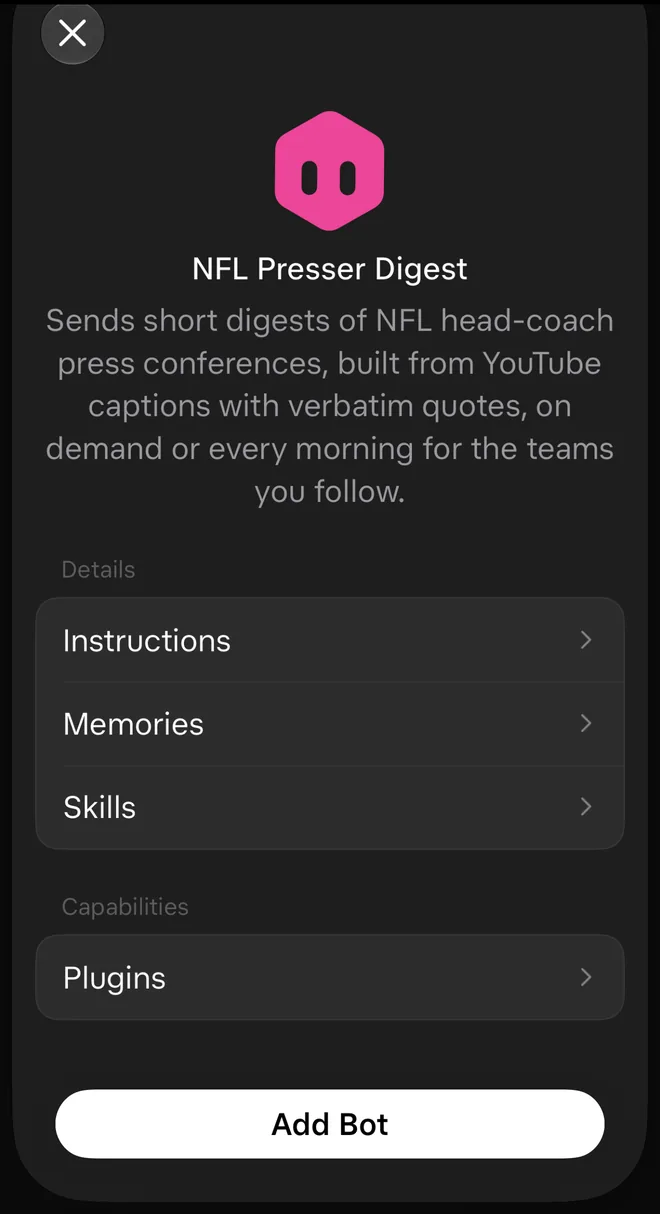
- On an iPhone, we tapped the template link that was sent to us in a Grok Bot chat, and it opened the review screen in the Grok Bot app. The review screen listed Details (Instructions, Memories, Skills) and Capabilities (Plugins), then an Add Bot button. That review screen is in the app. It is not the preview page on x.ai, which we also opened (see below).
This is the review screen on the iPhone for the template we tested.
- The template's routine didn't come over, and the review screen had no Routines section. The plugin we included was installed. The one memory we included came over, but it was filed as a different kind of memory than it started as. We left our personal memories out of the template, and none showed up on the imported Bot.
That differs from what SpaceXSI's Create and manage Bots page describes: it says a public link exposes "the Bot's shared configuration: its identity, description, skills, and routines." Our public preview page, on the other hand, showed the name, the "by Eric" byline, the description, a disclaimer and an Add to Grok Bot button, with no skills, routines, memories or plugins. One test can't tell us whether templates can carry routines at all, or whether this one simply didn't. The routine on our source Bot had been paused since October 29, which might be why it didn't come over. We didn't test that.
Our test has limits. We added the template on the same account that made it, so we can't say what a different person's account would get. Skills can't be tested that way: the review screen listed both of our skills, and the imported Bot showed both with no duplicates, but the account already had them, so our test couldn't settle whether skills transfer from one account to another. Some memories about the owner are visible to every Bot on an account by design, so our test can't show whether personal details would reach a different person's account. We checked what arrived by reading the imported Bot's setup without changing anything, and by asking the Bot what it had. We didn't check it any further than that. The screenshot above is the review screen on the iPhone, before we added the Bot.
What to check if you do look at one
This is a list of checks, not a recommendation to add a template.
- Know who made it. SpaceXSI's docs are plain about it: "Shared templates are created by other users, not by Grok Bot." A real template page says, "This AI bot was created by a third-party user, not by SpaceXSI. It may act on your behalf."
- Read the preview page. A template link opens a preview page on x.ai, and the description is on that page. On an iPhone, when we tapped a template link sent in a Grok Bot chat, it opened the review screen in the Grok Bot app instead. Finishing the add happens in the Grok Bot app.
- Review the details. The guide describes the review this way: "Now I see the context and integrations included with the bot. I can check to make sure this is what I'd expect and then click Add Bot." It also says to "read through the context and integrations, and make sure everything in the template is exactly what you'd expect before installing it."
- Judge it the way you would judge software. The guide's advice is to "Evaluate templates just like you would evaluate skills or software."
- Remember where a copy would land. It lands on your account, and SpaceXSI's docs warn, "The computer is assigned to your user account, not an individual Bot. Do not place a credential or file on it if another Bot on your account should not be able to use it."
- Check what actually arrived. Cursor staff confirmed on the Cursor forum that skills shown in a template's preview don't arrive on the imported Bot. In the thread, a Cursor staff member wrote on October 9, 2026, "This is still an issue we’re tracking: skills shown in a template’s preview don’t arrive on the imported bot." A staff reply on October 12, 2026 said, "This is still an issue we’re tracking," and that was the latest staff reply we saw in the thread. The thread is here: https://forum.cursor.com/t/grok-bot-templates-preview-shows-skills-but-the-export-ships-skills-skills-are-never-delivered/169911. The forum reply doesn't say whether it meant the preview page on x.ai or the review screen in the app. So a preview that lists skills doesn't prove they came across. Our Nov 1 test, on the same account, couldn't settle it. SpaceXSI's changelog says, "A Bot's template skills show under Private skills, labeled From template," so look there. This next part is my suggestion, not something SpaceXSI documents: ask the Bot to describe its job and its rules, and to tell you what it will submit before it starts anything.
Two templates that came with Grok Bot v0.78.1
Source: Grok Bot changelog, v0.78.1 (October 27, 2026), read on November 3, 2026. Two template lines are in that entry, word for word:
- "The Try it, don't pay for it template starts a free trial for you and cancels it, or reminds you, before it bills."
- "The Find unused subscriptions template cancels plans you pick from the ones you still pay for, and Watch subscription prices checks renewal prices."
Our page Grok Bot v0.78.1: Shopping cards and subscription templates lists the rest of that release, and Can my Grok Bot cancel free trials and unused subscriptions? covers the subscription side. In those changelog lines, I didn't find where these templates are listed or how to start one. For the Team Bots lines from the same release, see How do Team Bots work in Grok Bot, and what did v0.78.1 change?
What we couldn't find
We didn't find anything in the Grok Bot docs about how to read a Bot's instructions after a template is added, or what counts as a "relevant" memory. We also didn't find anything that says a template has been reviewed or approved by anyone before you see it.
Follow me at @EricSoundMinds for the next Grok Bot Hot Topic.
Sources
Official pages, all checked October 31, 2026:
Templates for Grok Bot (SpaceXSI guide): https://x.ai/bot/guides/templates-for-grok-bot
Create and manage Bots (Share a Bot): https://docs.x.ai/grok-bot/bots
Frequently asked questions: https://docs.x.ai/grok-bot/faq
Approvals, security, and privacy (sharing a Bot is not a security boundary): https://docs.x.ai/grok-bot/approvals-security-and-privacy
Computer and apps (the computer belongs to your account): https://docs.x.ai/grok-bot/computer-and-apps
Grok Bot changelog (templates, template skills): https://x.ai/changelog/bot
The Try it, don't pay for it template starts a free trial for you and cancels it, or reminds you, before it bills.
The Find unused subscriptions template cancels plans you pick from the ones you still pay for, and Watch subscription prices checks renewal prices.
A third-party template page on x.ai (wording of the third-party notice): https://x.ai/bot/_jOdbfkB16zxu7MRcmReE
Cursor forum, staff replies in a bug report (Cursor staff, not SpaceXSI docs): https://forum.cursor.com/t/grok-bot-templates-preview-shows-skills-but-the-export-ships-skills-skills-are-never-delivered/169911
See how I set up Grok Bot: https://www.soundminds.ai/setup.