How do I stop a Grok Bot skipping its rules?
I didn't find a setting that forces a Grok Bot to follow every rule. The official docs suggest lasting rules and Ask first approvals; in our setup, a check that compares each post to an exact wording file has helped most.
All Grok Bot questions: https://www.soundminds.ai/faq.
Last updated Nov 21, 2026
I didn't find a setting in the official Grok Bot docs that forces a Bot to follow every rule. The official docs suggest asking the Bot to remember lasting rules, and backing anything you can't undo with an Ask first approval. In our own setup, what has helped is keeping the exact wording in one shared file, and a script that checks every post against that file and refuses old lines and signatures.
This page is our experience running our own Grok Bots. It is not official guidance from Grok Bot or xAI. Nothing here guarantees that a Bot will always comply.
All Grok Bot questions: https://www.soundminds.ai/faq.
Short answer
Engineers do have to work on this. We do too, and it is improving, not solved.
A Bot can keep lasting rules in its memory if you ask it to remember them. I found that on SpaceXSI's Create and manage Bots page, which also says, "Memory is not a substitute for an authoritative source:" and tells you to "Back safety boundaries with approvals and Auto-review rules rather than memory alone".
In our setup, telling a Bot "from now on, always do this," even more than once, has not been enough. When a closing line we use on public replies changed, drafts still used the old line. What fixed that for us was keeping the exact new line in one shared file, and adding a small script that checks every post before it goes out and refuses a draft that still has the old line or a signature we had removed.
Steps
Step 1: The official docs recommend telling the Bot the lasting rule in chat, and asking it to remember. SpaceXSI's Create and manage Bots page gives this kind of example: "From now on, never send external messages without approval." For a one-time task, put the details in an ordinary message instead. Personal Bots no longer have a description or a Bot settings page, so you change what they do in chat. A Team Bot still has a description, which its owner or a Manager edits under About.
Step 2: The official docs recommend checking what the Bot remembered, and correcting it when it's wrong. There is no memory screen for a personal Bot. On that same Bots page, the way to see it is to ask, "What do you remember about me?" You can also tell it to correct a stale assumption or to forget something. SpaceXSI's How Grok Bot works page says memories can go out of date.
Step 3: The official docs recommend that for anything you can't undo, such as sending, publishing, or deleting, you add a narrow Ask first rule in Auto Review. I checked SpaceXSI's Approvals, security, and privacy page, and it says Ask first rules "always stop matching actions for you." Auto Review is on by default. You add a Custom Rule in Settings, then General, under Bot: describe one action in plain words, and choose Ask first or Allow automatically. This stops a matching tool, app, or computer action and asks you first. It is not a documented way to make the Bot follow every standing instruction, such as a writing rule or a process step. The steps for adding a rule are on our page How do I add an Auto-review rule in chat?.
Step 4: The official docs recommend that when a process works, you save it as a skill, and include the decision rules and what needs your approval. SpaceXSI's Skills and routines page says, "Start with a one-time task. Make it reliable, save the method as a skill, and only then automate it." A skill "captures steps, decision rules, expected output, and safety boundaries." In our setup, we keep standing how-to rules in skills the Bot is told to use, such as a writing-voice skill, instead of hoping it will recall them from an old chat.
Step 5: In our setup, the exact last line of a public reply is kept in one shared file, and a script checks every post against that file and refuses a draft that still has the old line or a signature we had removed. The same script also counts how many posts we have already sent in a day, so we don't rely on the Bot to remember a limit.
Step 6: The official docs recommend adding Ask first rules for anything you can't undo. SpaceXSI's How Grok Bot works page says, "Add specific Ask first rules for sending, publishing, and deleting." It also says, "Keep Ask first rules on anything you can't undo."
More on keeping facts in files rather than memory is on the General tips page.
When words aren't getting through, send a screenshot
If you have already told your Bot more than once to stop doing something, and it keeps doing it, send a screenshot of what you are looking at. You can paste an image into the chat, or attach it from the composer. On a phone, you can take or attach a photo, or choose an image or file.
This next part is what happened to me, not something the official docs say. I had told my Bot several times to show me the text of a post, not a file path. It still put a file path on the draft card I was supposed to approve. I uploaded a screenshot of that card. Once the Bot saw the image, it understood the problem, recreated the card with the post text in it, and I asked it to remember never to do that again.
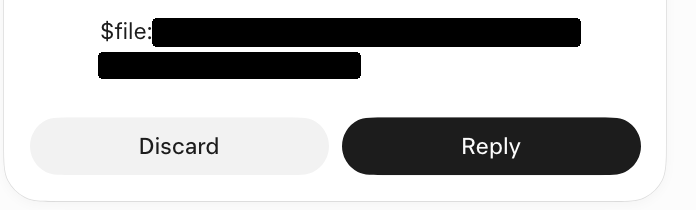
Step 1: Take a screenshot of exactly what you see. Before you send it, hide passwords, keys, and tokens. If the problem is a file path or an id showing up where it shouldn't, you may need to leave that part visible so the Bot can see the mistake, then tell it not to repeat those details in its reply.
Step 2: Attach the screenshot in the chat, or paste it into the composer, and tell the Bot what is wrong in the picture.
Step 3: Once it has fixed the problem, ask it to remember the rule, so it does not do the same thing again.
A screenshot helped in my case. It does not mean the Bot will never skip a rule again.
What this will not do
I didn't find anything in the official Grok Bot docs about stopping a Bot from skipping its rules, or about instruction drift after a week or two. I am not going to guess at a product bug, or at a setting that forces compliance.
Adding more "hard rules" in chat, by itself, has not been enough in our setup. Starting a new Bot as a fix is not something we have tested, so I am leaving it out.
Auto Review is "model-based and should complement, not replace, least privilege and explicit approval boundaries." The wording-file check in our own work has reduced the chance that a skipped rule goes out. It does not guarantee that a Bot will always comply.
Copy this message to your Grok Bot
This message asks your Bot to show you the rules it would follow, and to wait for your yes before it adopts them.
I want to reduce the chance that you skip a lasting rule. Don't change any setting, skill, routine, or file until I approve each change.

1. Show me the lasting rules you already remember, then wait. I will correct or add any that are missing.
2. Once I approve a lasting rule, remember it, and also offer to keep the exact wording in a note or a skill we can both open later.
3. For sending, publishing, deleting, or anything else I can't undo, offer a narrow Ask first Auto-review rule and wait for my yes before adding it.
4. Before you send, publish, or post anything, show me the exact draft and wait for my yes. If we have a required last line or another exact wording rule, open that source and check the draft against it first.
5. If you notice that you have drifted off a rule, stop and tell me, instead of adding another "hard rule" in chat and continuing.

Show me the exact rules you would follow, and wait for my yes before you adopt any of them.
Sources
SpaceXSI docs, Create and manage Bots: https://docs.x.ai/grok-bot/bots, last updated November 16, 2026.
When you discover a durable preference, boundary, or responsibility that should shape future work, tell the Bot and ask it to remember.
To make sure it keeps something, ask it to remember, for example: “Remember that I'm out every Friday.”
Lasting rule: “From now on, never send external messages without approval.”
The Bot keeps lasting rules in its memory. Personal Bots no longer have a description or a Bot settings page; to change what a Bot does, tell it in chat. A Team Bot still has a description, which its owner or a Manager edits under About in the Bot's details.
To see it: “What do you remember about me?”
Memory is not a substitute for an authoritative source:
Back safety boundaries with approvals and Auto-review rules rather than memory alone
SpaceXSI docs, How Grok Bot works: https://docs.x.ai/grok-bot/how-grok-bot-works, last updated November 13, 2026.
Ask a Bot to remember rules that last. Put the details of a single task in your message.
Add specific Ask first rules for sending, publishing, and deleting.
Keep Ask first rules on anything you can't undo.
SpaceXSI docs, Approvals, security, and privacy: https://docs.x.ai/grok-bot/approvals-security-and-privacy, last updated November 13, 2026.
Ask first rules always stop matching actions for you.
Write one short, narrow rule for each action, around a known action and scope:
Auto Review is model-based and should complement, not replace, least privilege and explicit approval boundaries.
SpaceXSI docs, Skills and routines: https://docs.x.ai/grok-bot/skills-routines-and-automations, last updated November 11, 2026.
Start with a one-time task. Make it reliable, save the method as a skill, and only then automate it.
A skill captures steps, decision rules, expected output, and safety boundaries.
SpaceXSI docs, Message and collaborate: https://docs.x.ai/grok-bot/chat-and-collaboration, last updated November 19, 2026.
Paste text, links, and images
Attach local files
SpaceXSI docs, Files and results: https://docs.x.ai/grok-bot/files-and-results, last updated November 19, 2026.
Use the attachment control or drag files into the composer. You can also paste images and links.
Images, audio, and video
Tell the Bot what each attachment is and how it should use it:
SpaceXSI docs, Grok Bot for Mobile: https://docs.x.ai/grok-bot/mobile, last updated November 19, 2026.
Take or attach a photo
Choose an image or file
See how I set up Grok Bot: https://www.soundminds.ai/setup.