How do I clip a video on X?
Clipping on X lets you take a short moment from a long video, add your commentary, and post it in the X app, with credit and a link back to the original.
All Grok Bot questions: https://www.soundminds.ai/faq.
Last updated Nov 9, 2026
Part of our Grok Bot Hot Topics series
Short answer
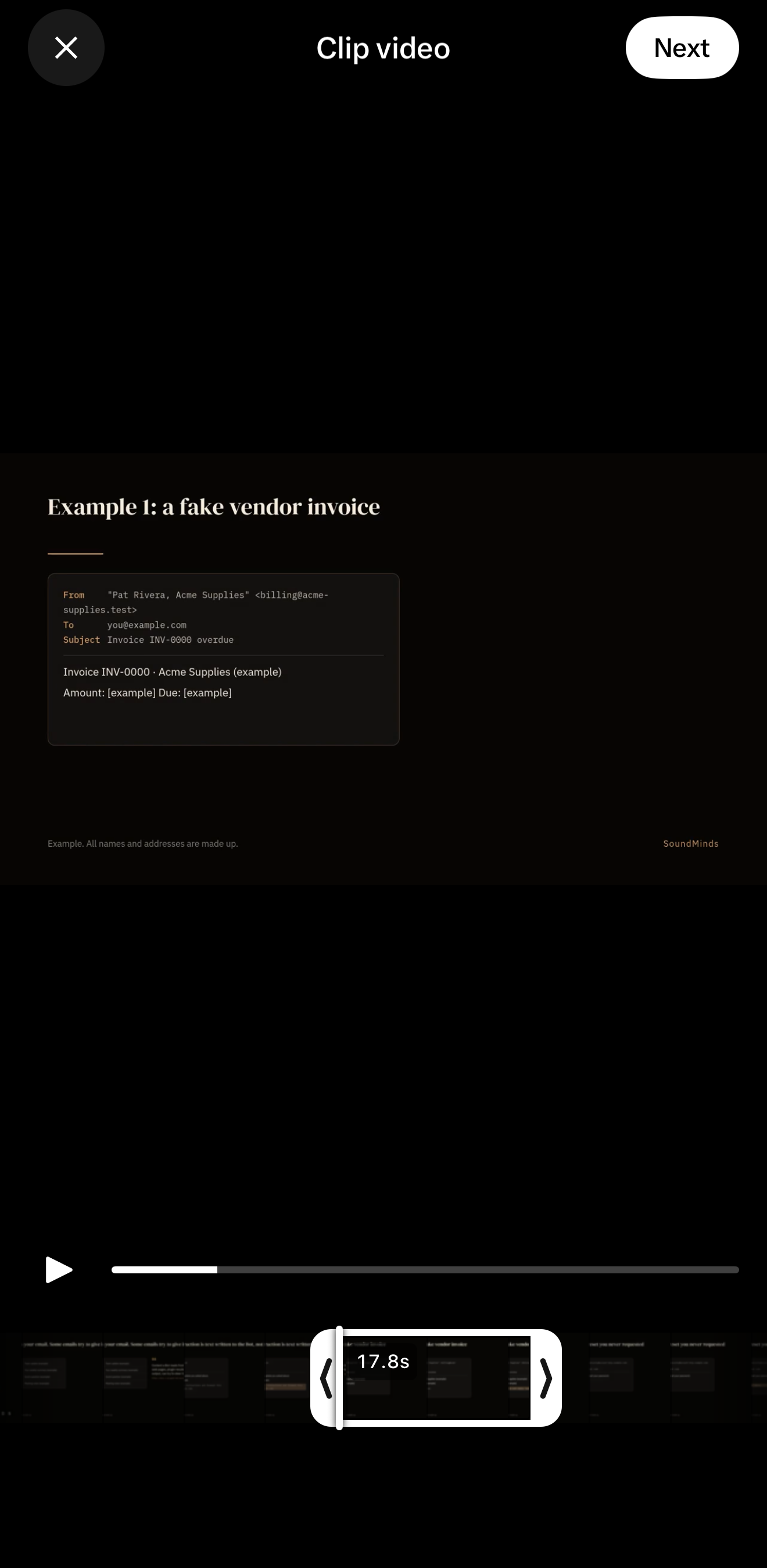
Clipping on X lets you take a short moment from a long video, add your commentary, and post it in the X app, with credit and a link back to the original. This is an X feature, not a Grok Bot feature. I checked the About clipping on X page in X's Help Center, and it says, "Clipping is now live in the X app on iOS and Android. Web is coming soon." You can clip a pre-recorded video that is at least 2 minutes long. A clip can run from 5 to 60 seconds, and no more than 30% of the original. I tried this in the X app on my iPhone on Nov 9, 2026, not in the Grok Bot app. "Clip video" appeared immediately on a video about 3 minutes and 39 seconds long, and the trimmer opened with a 17.8-second selection. I did not post. On a 54-second video, "Clip video" was correctly missing from the Repost menu.
Your Grok Bot can help you check whether a video is eligible, suggest timestamped moments, and draft commentary. It cannot post a clip.
How to clip a video
On Nov 9, 2026, @XCreators wrote: "To clip a video, tap Repost, then Clip video. Pick your moment, add your commentary, and post." Here are those steps in the iOS or Android app:
- Find the video you want to clip and tap the "Repost" icon.
- Tap "Clip video".
- Drag the handles on the trimmer to choose your moment, from 5 to 60 seconds. If your clip is longer than 30% of the original video, you will see an alert.
- Tap "Next" to add the clip to your post.
- Add your commentary, then tap "Post".
To change your selection before you post, tap the clip in your post to reopen the trimmer.
What I saw on my iPhone
I opened the Repost menu, tapped "Clip video," and reached the trimmer in the X app on my iPhone. I stopped before I tapped Post.
On Nov 9, 2026, around 8:21pm EST, I opened this post, a video about 3 minutes and 39 seconds long. "Clip video" appeared immediately in the Repost menu, with no wait.
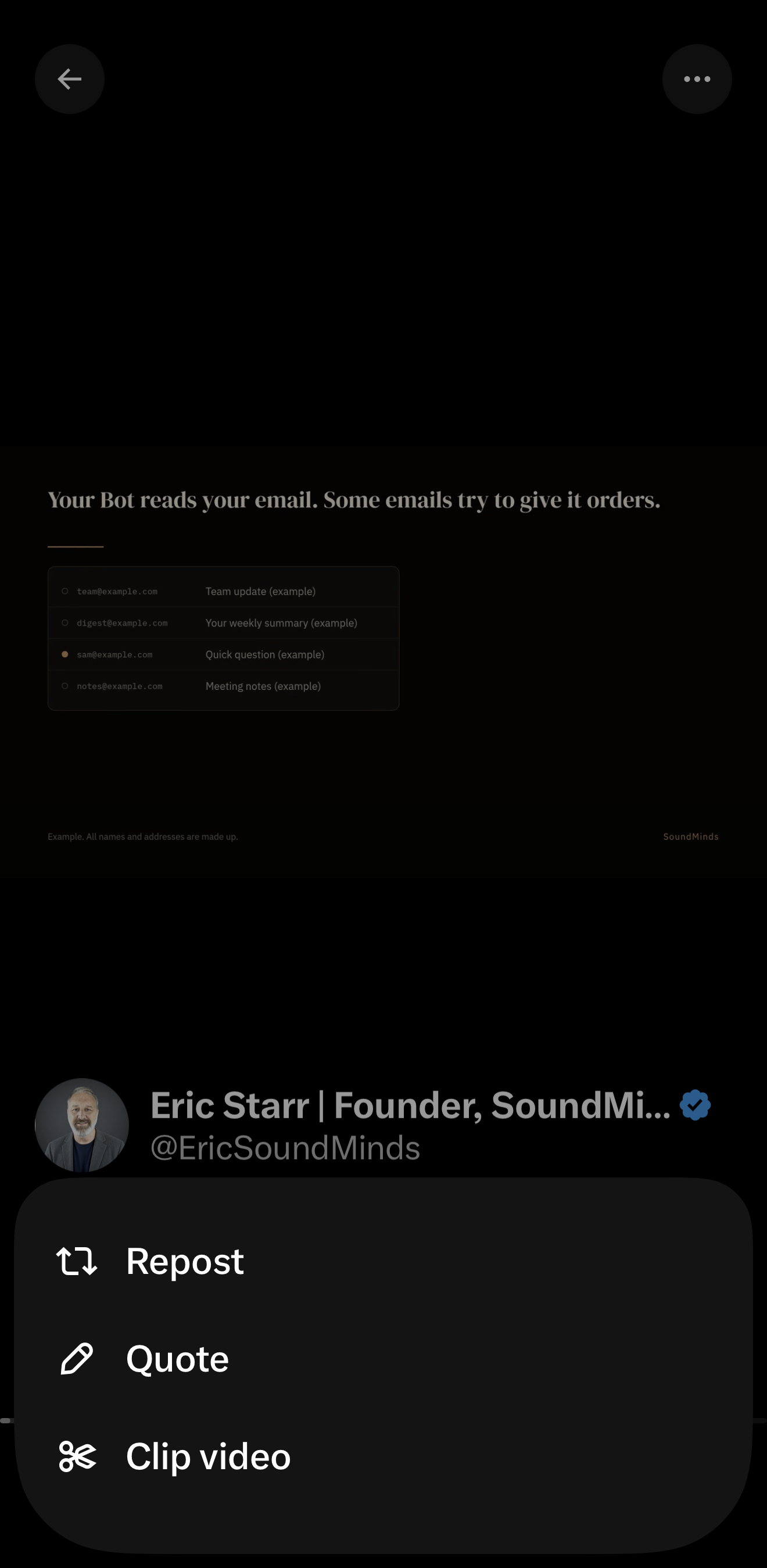
By 8:22pm EST the trimmer was open, with a 17.8-second selection. I did not post.
I also opened this 54-second video. The Repost menu had only Repost and Quote. "Clip video" was correctly absent, because that video is under the 2-minute minimum.
Which videos you can clip
Eligible videos are pre-recorded and at least 2 minutes long. Live broadcasts cannot be clipped yet.
A clip can be between 5 and 60 seconds, and up to 30% of the original video. For example, a clip from a 2-minute video can be up to 36 seconds long. Videos longer than 3 minutes and 20 seconds can be clipped for the full 60 seconds.
Anyone using the latest version of the X app on iOS or Android can clip eligible videos. I didn't find a Premium or plan requirement, or a list of countries, on that help page. Clipping may vary by app version and region. You cannot clip on x.com yet.
If you don't see "Clip video"
If "Clip video" does not appear in the "Repost" menu, the video may be a livestream or under 2 minutes, or your app may need an update. Update the X app and check that the video is pre-recorded and at least 2 minutes long.
The trimmer will not go longer than 60 seconds or shorter than 5 seconds. If you see an alert while trimming, the clip is longer than 30% of the original, so shorten it. If a posted clip plays as a regular video, the original may no longer be eligible, or the app may need an update.
@XCreators' announcement includes a 29-second promo. That video is under the 2-minute minimum, so it is not an eligible source.
Credit, earnings, and clips of your videos
Clips play in the timeline like any other video. Tap the "Clip from" label to open the original video at the moment the clip starts. A timestamp shows where the clip sits in the original, such as 1:14 / 25:00.
To earn from clips, you need to be enrolled in Original Content Rewards. Engagement on a clip you post counts toward your earnings, the same as your other posts. If your video is clipped, you earn from those clips. Those earnings are calculated the same way as earnings from embedded reposts of your content. Clip earnings are included in regular Original Content Rewards payouts, starting with the first payout after clipping launches. Clips do not count toward the Video Kickstart Bonus, because a clip is a post of someone else's video.
Any eligible video you post can be clipped. You cannot turn off clipping for your videos right now. If you delete your original video, any clips of it are removed too.
What people are reporting
These are user reports from Nov 9, 2026, not official documentation. I haven't verified them myself.
@Ldataengineer wrote that it worked on iPhone: Repost, then "Clip video," then drag the handles, then Next, then add a take. The post showed a "Clip from" label with the creator's name. It did not appear right after updating; it showed up after 5 to 10 minutes. @blessings_soul wrote that everything worked smoothly from editing the clip to publishing it on mobile.
Other people said they could not find the button after updating, including @SadieSupaDoge on iOS, @brianoliveri on iPhone, @TavCannaLLC, @PandaCoder6969, and @BiscuitsofBlue. @chalavyishmael wrote that clipping "in central" did not work, with glitches, and that moving the edit bar did not change the length of the clip. @blessings_soul also wrote that on the web, the full original video was displayed, while mobile showed only the clipped span.
@cydelmg wrote that they wanted to clip the @XCreators announcement and could not. That announcement's promo is 29 seconds long, which is under the official 2-minute minimum, so this looks like confusion about eligibility, not a confirmed bug.
What your Grok Bot can do
You can point your Bot at this page to adopt this practice.
A Grok Bot cannot post a clip. Clipping is in the iOS and Android app only, web is coming soon, and I didn't find a web or API way for a Bot to create a clip. You do the tap steps in the app.
What a Bot can do is check eligibility, list timestamped moments, and draft commentary, then wait for you to post. Paste the block below into a chat with your Grok Bot.
When I point you at an X video post and ask about clipping it, do this:

1. Check eligibility from the post. The video must be pre-recorded, not a livestream, and at least 2 minutes long. A clip can run from 5 to 60 seconds, and no more than 30% of the original. For a 2-minute video, that cap is 36 seconds. Only videos longer than 3 minutes and 20 seconds can be clipped for the full 60 seconds. If the video is ineligible, tell me why and stop.

2. Suggest timestamped moments that make sense on their own, each with a start time and an end time inside that length cap.

3. Draft commentary I can paste into the X app when I post the clip.

Do not post, repost, or clip on my behalf. I will do the tap steps myself in the X app on iOS or Android: Repost, then Clip video, then trim, then Next, then add the commentary and Post. There is no web or API clipping I can ask you to use.
Sources
- About clipping on X, X Help Center. Retrieved Nov 9, 2026. The page has no visible last-updated date. A last-updated stamp in the page data is Nov 9, 2026, 3:35pm EST.
- @XCreators, Clipping is here, Nov 9, 2026. The attached promo is 29 seconds long.
- @XCreators, how-to self-reply, Nov 9, 2026.
- Original Content Rewards and Video Kickstart Bonus, linked from the clipping help page.
- My test in the X app on iPhone, Nov 9, 2026, around 8:21–8:22pm EST, on this video about 3 minutes and 39 seconds long and this 54-second video. I did not post. The screenshots are cropped to remove the status bar and anything personal.
- User reports, not official documentation: @Ldataengineer, @blessings_soul, @SadieSupaDoge, @brianoliveri, @TavCannaLLC, @PandaCoder6969, @BiscuitsofBlue, @chalavyishmael, @cydelmg.
See how I set up Grok Bot: https://www.soundminds.ai/setup.