How do I update a saved secret or API key in Grok Bot if I can't see it?
After you save a secret, Grok Bot does not show the value again, but you can still replace it with a new value.
All Grok Bot questions: https://www.soundminds.ai/faq.
Last updated Nov 10, 2026
Part of our Grok Bot Hot Topics series
Short answer
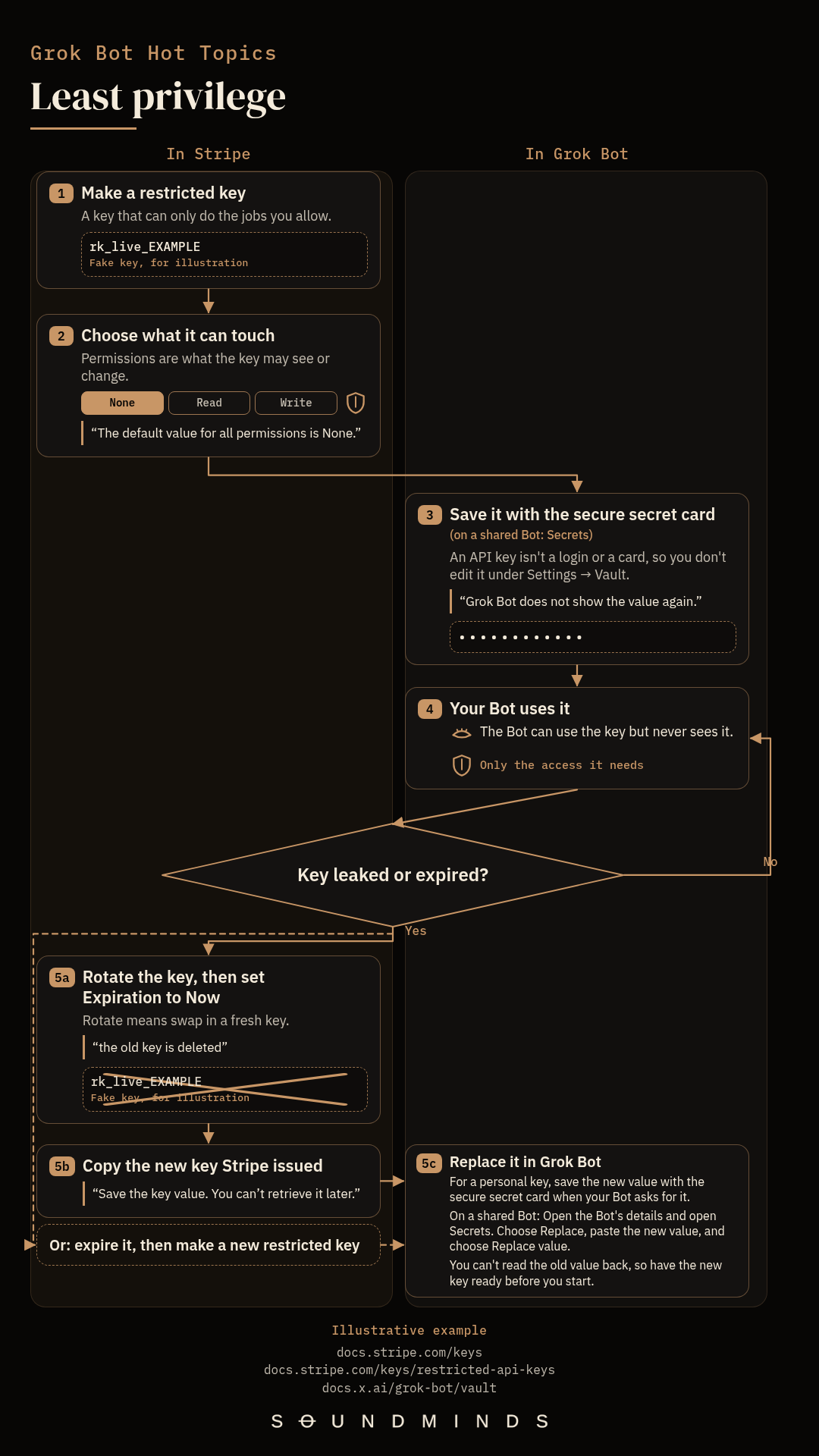
After you save a secret, Grok Bot does not show the value again, but you can still replace it with a new value. For a personal key, save the new value with the secure secret card. On a shared Bot, open Secrets and choose Replace. I think that design is consistent with the least-privilege principle, and that is the most secure approach. A blank field later is not proof the secret was deleted.
If you're not technical, this can feel strange at first. Most apps show you everything you've typed in, so a field that hides what you saved can look like something's broken. It isn't broken, and the hiding is on purpose. Once a secret is saved, Grok Bot doesn't show it again, not even to your Bot. Your Bot can still use it without ever seeing it. So I see the hiding as a feature that protects you, not a limitation.
Why a saved secret is not shown again
I checked SpaceXSI's Vault and secure sign-in page, and it says, "After you save a secret, Grok Bot does not show the value again; a blank field later is not proof the secret was deleted." Saved values are write-only. On a shared Bot, Secrets lists the name and description only, and it never shows the value again. The footer on the secure secret card reads "Stored securely, never shown to your Bot."
That design is consistent with the least-privilege principle, which is to allow only the access that's needed to do the job. I didn't find anything on SpaceXSI's Vault page about why they chose it, so I'm not claiming that was the reason. I'm saying the design fits that principle, and I think it's the most secure approach.
NIST SP 800-53, control AC-6 (Least Privilege), has this line: "Employ the principle of least privilege, allowing only authorized accesses for users (or processes acting on behalf of users) that are necessary to accomplish assigned organizational tasks."
OWASP's Secrets Management Cheat Sheet has a similar idea for secrets. When users can read a secret in a secret management system, it can leak through them, so the least-privilege principle should be applied. In a separate section on automation, the cheat sheet has this line: "it is better to limit or remove the human interaction with the actual secrets."
An example: a Stripe restricted key
Here's a concrete case. You create a Stripe restricted API key for an integration, scoped to just what that job needs, and you save it with the secure secret card, or under a shared Bot's Secrets. This is a key you create for the integration, not a claim about the permissions any particular connector asks for.
Stripe's restricted API keys page has this line: "the minimum permissions necessary to do its job, and no more." When you create the key, you select None, Read, or Write for each resource, and "The default value for all permissions is None." One official example maps retrieving a customer to Customers: Read. Stripe's best-practices page has a similar idea: "you can give your invoicing system the ability to manage invoices and nothing else."
A restricted key starts with rk_live_ or rk_test_. In this FAQ, I'll use rk_live_EXAMPLE, which is a fake, illustrative value, not a real key.
For a restricted key you create in live mode, Stripe's page has this line (RAK is Stripe's short name for a restricted API key): "If you create a RAK yourself, you can’t reveal it after you’ve seen it once." You can later reveal live-mode keys that Stripe created for you, such as a default secret key or a key from a scheduled rotation. In sandbox mode, "you can always see all of your API keys, including restricted and secret keys." After you save rk_live_EXAMPLE with the secure secret card, Grok Bot does not show the value again either.
How to edit a stored key
An API key isn't a login or a card, so you don't edit it under Settings → Vault. You save it with the secure secret card when a Bot asks for one, or, on a shared Bot you own or manage, under Secrets.
Here are SpaceXSI's steps for changing a secret on a shared Bot:
Step 1: Open the Bot's details and open Secrets.
Step 2: Choose Replace, paste the new value, and choose Replace value.
You can't read the old value back, so have the new key ready before you start. I didn't find steps on that page for changing a personal key after you saved it with the secure secret card. The card does not show the value after Saved.
Why a token needs refreshing
A key can expire, or it can get exposed. Stripe's API keys page explains that you can expire a restricted or secret API key. After you expire it, "you must create a new one and update any code that uses the expired key." Code that uses the expired key can no longer make API calls.
A key can also leak. One way that can happen is an AI coding tool printing it in a log or a file. Don't paste an API key into ordinary chat, a Shell command, or a file on the computer.
What to do if a key is exposed
If a restricted or secret Stripe key is exposed, Stripe's best-practices page has this line: "If a restricted or secret API key is exposed or compromised, rotate it immediately even if you aren’t sure anyone saw it." In the Stripe Dashboard, on the API keys page, open the key's overflow menu (⋯) and choose Rotate key. "Rotating an API key revokes it and generates a replacement key that’s ready to use immediately."
When you rotate a key, Stripe can keep the old and new keys both working "for up to 7 days," which is meant to avoid downtime. For a leaked key, you don't want the old key to keep working. In the Expiration dropdown, choose Now, because "If you choose Now, the old key is deleted." Then copy the new key value and save it. You can't retrieve it later. On a shared Bot, paste that new value under Secrets with Replace, as above. For a personal key, save the new value with the secure secret card when your Bot asks for it.
If you expire the old key instead of rotating it, create a new restricted key in the Dashboard, then save the new value with the secure secret card, or with Replace under a shared Bot's Secrets. Don't paste the key into ordinary chat.
Sources
See how I set up Grok Bot: https://www.soundminds.ai/setup.