How do I connect Grok Bot to Obsidian?
Obsidian Help says Obsidian is an official plugin for Grok Bot. Open Obsidian for Grok Bot and select Add to Grok Bot.
All Grok Bot questions: https://www.soundminds.ai/faq.
Last updated Nov 19, 2026
Short answer
Open Obsidian for Grok Bot and select Add to Grok Bot. I checked Obsidian Help's Skills page on November 19, 2026. Under Install, it says, "Obsidian is an official plugin for ChatGPT, Codex, Cursor, and Grok Bot." The next sentence says, "Other agents install the skills from GitHub." Under Grok Bot, it says, "Open Obsidian for Grok Bot and select Add to Grok Bot."
The plugin page is titled "Obsidian for Grok Bot." It says, "Published by Obsidian on the Cursor Marketplace." The button on that page says Add to Grok Bot. It also says, "By clicking “Add to Grok Bot”, you accept the terms." The page says, "Work with local Obsidian vaults using the Obsidian CLI and skills for Markdown, Bases, Canvas, Sync and Publish, web extraction, and templates."
We also ran the same commands the official skills use on our own Mac on November 19, 2026. That test is under From our own testing (not official guidance), later on this page.
Steps
Step 1: Open Obsidian for Grok Bot. Obsidian Help's Install section points Grok Bot at that page.
Step 2: Select Add to Grok Bot. The plugin page shows that button, and it says, "By clicking “Add to Grok Bot”, you accept the terms."
What the skills do
Obsidian Help opens with this sentence: "Obsidian Skills are instructions that teach AI agents how to work with Obsidian." The next sentence says, "They follow the open Agent Skills format, so they work with any agent that supports skills, including Claude Code, Claude, ChatGPT, Cursor, Gemini CLI, GitHub Copilot, Grok Bot, OpenCode, and many more."
Then it says, "With Obsidian Skills an agent can:" The opening list is:
- Write notes in Obsidian Flavored Markdown, with wikilinks, embeds, callouts, and properties.
- Create and edit Bases and Canvas files.
- Search, read, and manage notes in the running app with Obsidian CLI.
- Sync and publish vaults without the desktop app using Obsidian Headless.
Requirements
The Requirements section says, "The obsidian-cli skill needs the Obsidian desktop app running with Obsidian CLI turned on, and an agent that can run commands on your computer."
It also says, "The Markdown, Bases, and Canvas skills only describe file formats, so they work in any agent that can read and write files in your vault."
The same section says, "Defuddle, Knap, and Obsidian Headless are separate tools that aren't bundled with the skills. When one is missing, the skill asks before installing it from npm."
Privacy
The Privacy section says, "Obsidian Skills don't send anything by themselves. When an agent uses them, the notes it reads become part of the conversation and are processed by the AI model you use."
The next sentence says, "Review your agent's privacy policy before you point it at a vault with sensitive notes."
What these pages don't say
The official pages don't say whether Grok Bot can reach Obsidian Sync directly, or whether the Bot's own computer can replace your desktop for the CLI skill. What we found in our own test is under From our own testing (not official guidance).
From our own testing (not official guidance)
We added the official Obsidian for Grok Bot plugin to a Bot and ran the commands from its CLI skill on our own Mac on November 19, 2026. We also read the plugin's public source. In that source, the plugin is a set of skills, not a cloud connector. Your Bot works on your vault by running commands, or editing files, on a computer that holds it. I checked the plugin manifest in Obsidian's public skills repo, and it says, "In the future we will add MCP so you can interact with your vault remotely and in the ChatGPT mobile app." That remote option is not in the plugin we read.
Does your computer need to be on? For a vault stored on your own computer, the computer holding the vault has to be on and reachable, with local commands allowed. With Obsidian closed, our Bot could still create, read, and delete a plain note by editing the vault's files, but only because that computer was on and the commands were approved. We did not test a sleeping or switched-off computer.
Turn on Obsidian's command line (from our own testing)
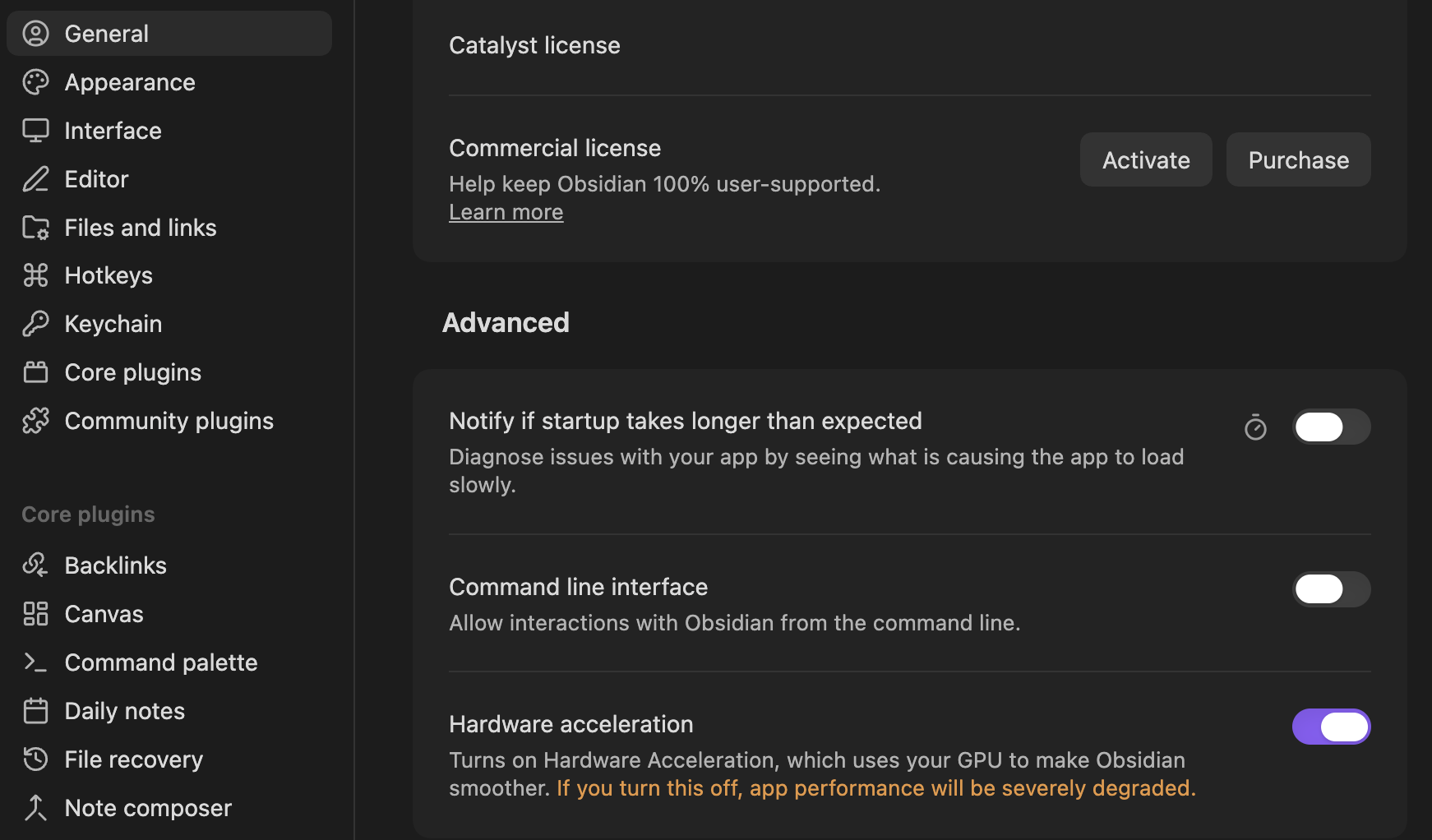
To use the Obsidian CLI skill, turn on the command line in Obsidian first. These are the steps we used on our own Mac on November 19, 2026.
- Open Obsidian Settings, then General, and scroll to Advanced.
- Turn on "Command line interface".
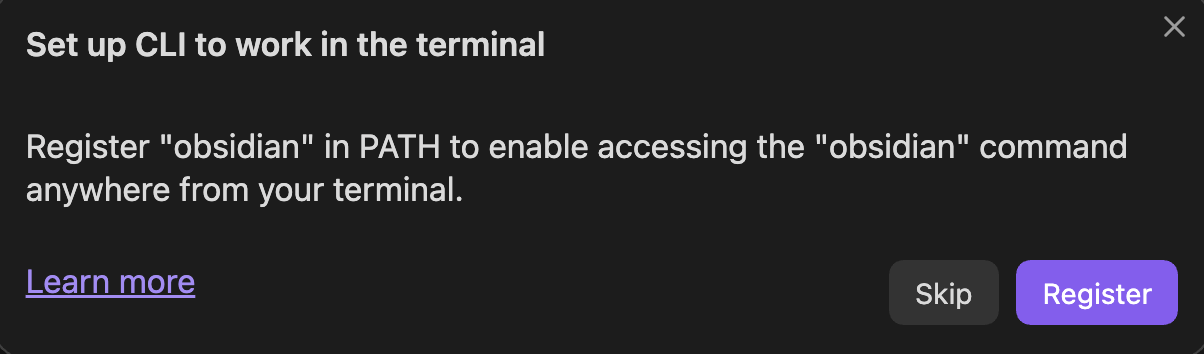
- When the "Set up CLI to work in the terminal" popup appears, click Register so the obsidian command works from the terminal.
The Obsidian CLI skill is stricter. With Obsidian closed it said, "The CLI is unable to find Obsidian. Please make sure Obsidian is running and try again." The CLI did not start the app. That was also true with the setting turned on. With Obsidian open but the command line setting off it said, "Command line interface is not enabled. Please turn it on in Settings > General > Advanced." So for the CLI skill, Obsidian has to be open and that setting has to be on. With Obsidian open and Settings > General > Advanced > Command line interface turned on, our Bot created a test note, read it, found it with search, and deleted it.
If your Bot gets "Vault not found.", have it name your vault in the command, as vault="Your Vault Name" right after obsidian, or run it from inside your vault folder. Also have it read the words it gets back, because the CLI exits with status 0 even when a command fails.
Can your Bot use Obsidian Sync directly? Not as a direct connection. The documented route is Obsidian Headless, a command-line client. That page has this line: "It lets you sync vaults from the command line without the desktop app, with all the speed, privacy, and end-to-end encryption benefits of Obsidian Sync." It also lists this reason to use it: "Give agentic tools access to a vault without access to your full computer." We installed it on a Bot's cloud computer. It stopped at "No account logged in. Run "ob login" first." Logging in waits for you to type your Obsidian account email, password, and any 2FA in a terminal. Obsidian Help's Headless Sync page has this line: "You must have an active Obsidian Sync subscription." That page also has this warning: "Do not use both the desktop app Sync and Headless Sync on the same device, as it can cause data conflicts. Only use one sync method per device." We have not tested Headless Sync end to end.
Sources
Obsidian Help, Skills: https://obsidian.md/help/skills, Checked November 19, 2026.
Obsidian Skills are instructions that teach AI agents how to work with Obsidian.
They follow the open Agent Skills format, so they work with any agent that supports skills, including Claude Code, Claude, ChatGPT, Cursor, Gemini CLI, GitHub Copilot, Grok Bot, OpenCode, and many more.
With Obsidian Skills an agent can:
Write notes in Obsidian Flavored Markdown, with wikilinks, embeds, callouts, and properties.
Create and edit Bases and Canvas files.
Search, read, and manage notes in the running app with Obsidian CLI.
Sync and publish vaults without the desktop app using Obsidian Headless.
Obsidian is an official plugin for ChatGPT, Codex, Cursor, and Grok Bot.
Other agents install the skills from GitHub.
Open Obsidian for Grok Bot and select Add to Grok Bot.
The obsidian-cli skill needs the Obsidian desktop app running with Obsidian CLI turned on, and an agent that can run commands on your computer.
The Markdown, Bases, and Canvas skills only describe file formats, so they work in any agent that can read and write files in your vault.
Defuddle, Knap, and Obsidian Headless are separate tools that aren't bundled with the skills. When one is missing, the skill asks before installing it from npm.
Obsidian Skills don't send anything by themselves. When an agent uses them, the notes it reads become part of the conversation and are processed by the AI model you use.
Review your agent's privacy policy before you point it at a vault with sensitive notes.
Obsidian for Grok Bot: https://x.ai/bot/plugin/88871845, Published by Obsidian on the Cursor Marketplace. Checked November 19, 2026.
Obsidian for Grok Bot
Work with local Obsidian vaults using the Obsidian CLI and skills for Markdown, Bases, Canvas, Sync and Publish, web extraction, and templates.
Published by Obsidian on the Cursor Marketplace.
By clicking “Add to Grok Bot”, you accept the terms.
Add to Grok Bot
Obsidian plugin manifest: https://github.com/obsidianmd/obsidian-skills/blob/462a27f/plugins/obsidian/plugin.json, From Obsidian's public skills repo, commit 462a27f, plugin v1.2.0. Checked November 19, 2026.
In the future we will add MCP so you can interact with your vault remotely and in the ChatGPT mobile app.
Obsidian Help, Headless: https://obsidian.md/help/headless, Checked November 19, 2026.
It lets you sync vaults from the command line without the desktop app, with all the speed, privacy, and end-to-end encryption benefits of Obsidian Sync.
Give agentic tools access to a vault without access to your full computer.
Obsidian Help, Headless Sync: https://obsidian.md/help/sync/headless, Checked November 19, 2026.
You must have an active Obsidian Sync subscription.
Do not use both the desktop app Sync and Headless Sync on the same device, as it can cause data conflicts. Only use one sync method per device.
Obsidian Help, CLI: https://obsidian.md/help/cli, Checked November 19, 2026.
Obsidian CLI requires the Obsidian app to be running.
See how I set up Grok Bot: https://www.soundminds.ai/setup.